🎙️ Opening Monologue
Welcome back. The kids are asleep, the coffee is lukewarm, and tonight, we’re looking at the target.
I remember the last time I did a major deployment via ClickOps. I was in the Azure portal, 14 tabs deep, trying to remember if I had enabled “Public IP” on the third subnet or the fourth. My “documentation” was a Teams message I’d sent to myself and a prayer that the region didn’t go down while I was mid-click.
That’s when it hit me. ClickOps is like cooking without a recipe. Sometimes it turns out right, but you can never quite recreate the magic twice.
🎯Episode Objective
This episode aligns with the Terraform Associate (004) exam objectives listed below.
- Explain what IaC is
- Describe the advantages of IaC patterns
- Explain how Terraform manages multi-cloud, hybrid cloud, and service-agnostic workflows
The ClickOps Trap: Defining Infrastructure Without Code
When I entered the IT world, my seniors used to tell us how “easy” we have it.
Honestly, They were right. It was a different kind of war.
Back then, the Source of Truth was a literal library of physical books and a digital graveyard of SOP (Standard Operating Procedure) PDFs and A SharePoint folder with 47 versions of “FINAL_v3_updated_FINAL.docx”. Back then, the document was Documents was the Source of Truth. and Document was the infrastructure.
In that era, the You had Document A for the network, Document B for the storage, and a prayer for the rest. They were the “Masters of Order,” trying to keep chaos at bay while manually aligning every setting.
Every change meant, updating the environment and updating the document. Hoping both still matched.
The Era of “Hope-Driven Development”
Before APIs ruled the world, building infrastructure was a manual labor of love (and terror). We lived in two worlds:
The Windows Wizard Loop A constant rhythmic clicking of Next > Next > I Accept > Next in a GUI wizard. You’d hit “Finish” and pray you checked the right box on screen 4 of 12.
The Linux Command Line Gamble: Typing long, complex strings of commands and hitting Enter with your eyes closed, hoping you didn’t just run a rm -rf on the wrong directory.
Imperative way
The old way of doing things was Imperative. You had to tell the computer every single step, like giving someone directions to make coffee:
- Walk to the kitchen.
- Open the cupboard.
- Take a mug.
- Boil the water.
- Put coffee in.
- Pour water.
If you forget to say “Open the cupboard,” the engineer crashes into a wooden door. In IT, if your script fails at step 5, you’re left with a “half-baked” VM and a messy environment.
The Great Shift: Why Manual Infrastructure Failed
Now, you might look at the “Windows Wizard Loop” or the “SOP Library” we just discussed and think:
“Bhuvan, that sounds like a skill issue.”
Fair question. But even an elephant with massive legs can stumble.
The “Masters of Order” were not incompetent. They were brilliant engineers operating inside a system that was fundamentally misaligned with modern speed. They weren’t losing because they lacked skill.
They were losing because the structure was outdated.
The Alignment Nightmare
In the legacy model, infrastructure was ticket-driven. And ticket-driven meant one thing:
Human latency.
Here’s how it usually unfolded:
- The developer finishes the application in two hours.
- A ticket is raised in the ITSM tool.
- The ticket waits.
- An Ops engineer picks it up.
- A meeting is scheduled to “align on requirements.”
- Our manager aligns with their manager.
- Leadership aligns with leadership.
- The planets align.
By the time the server was finally “clicked” into existence:
- Three weeks had passed.
- The requirements had shifted.
- The developer had context-switched three times.
This wasn’t inefficiency. It was structural drag. The system was optimized for stability in a slow-moving world. The world stopped moving slowly.
Three Problems That Made Manual Infrastructure Unsustainable
This wait-state model didn’t just feel painful. It became impossible at scale.
- The Manual Bottleneck: Ticket-based workflows are the graveyard of innovation. If it takes 14 days to get a sandbox environment, you aren’t going to experiment or iterate. You’re going to play it safe, which is how tech debt starts.
- The “Black Box” Problem: Manual setups leave no digital trail. Only the person who built the server at 2:00 AM knows why that specific setting was toggled. If that person leaves the company, they take the “Source of Truth” with them, leaving the rest of us with a mysterious black box we’re afraid to touch.
- The DevOps Roadblock: We talk a lot about “Continuous Integration” and “Continuous Deployment.” But you cannot have a “Continuous” pipeline if a human has to manually click “Create Instance” in the middle of it. A single manual mouse-click breaks the entire automation chain.
The Declaration: Defining Infrastructure as Code
Infrastructure as Code (IaC) isn’t just a fancy tool; it’s a departure from this chaos. It’s the practice of managing your infrastructure through machine-readable code, treating your servers and networks with the same rigor you apply to application software, rather than manual processes or or interactive web consoles (like the AWS or Azure Portal).
With IaC:
- Infrastructure is described declaratively
- The desired state is written in code
- Changes are applied through automated workflows
- The same definitions can be versioned, reviewed, tested, and reused
In practical terms, IaC treats infrastructure the same way modern teams treat application code:
- Stored in version control
- Reviewed through pull requests
- Reproducible across environments
- Recoverable through history
IaC does not eliminate people — it eliminates undocumented decisions.
Instead of infrastructure being “whatever exists right now,” IaC makes it whatever the code says should exist.
That shift — from manual state to declared intent — is the foundation on which Terraform and modern cloud operations are built.
The Architect’s Edge: Core Advantages of Coding the Cloud
Once infrastructure is defined as code, the operating model changes completely:
Speed and Efficiency
- Simple and Speedy: IaC allows you to automate the setup of your infrastructure, reducing manual intervention and the potential for human error. What used to take a two-week ticket now takes a two-minute
apply. - Increased Productivity: Developers and engineers get more time to focus on building features rather than wrestling with server configurations.
- Cost Savings: Beyond just saving time, IaC saves money. You can programmatically tear down “Ghost” or “Zombie” environments when they are not in use (like turning off Dev environments on weekends).
Consistency and Stability
- Configuration Consistency: By using code to define infrastructure, you ensure that the exact same configuration is applied every time. This eliminates the “Snowflake Server” problem and ensures Dev, Test, and Prod are identical.
- Stability through Version Control: When IaC is combined with Git, you gain an “Undo” button for your datacenter. If a change breaks the network, you simply revert to the previous commit.
- Scalability: Write once, deploy everywhere. A well-written template can be reused across multiple regions globally, making horizontal scaling a matter of changing a few variables.
Risk, Security, and Visibility
- Visibility as Documentation: The code is the documentation. You don’t have to hunt through the AWS web console to see which ports are open; you just read the configuration file.
- Security by Design: Once you create a “hardened” and secure architecture template, you can reuse it for every project. This ensures that every deployment follows your organization’s security best practices by default.
- Risk Minimization & Audit: IaC provides “Institutional Insurance.” If a key engineer leaves the company, their knowledge doesn’t leave with them — it’s already codified in your repositories. This also creates a perfect audit trail for compliance teams.
A “Late Night” Note for the Blog:
The real magic isn’t just that the infrastructure is code — it’s that the infrastructure is versioned. Being able to see exactly what changed at 3:00 AM on a Tuesday is the difference between an hour of downtime and a weekend of disaster.
Enter Terraform: Establishing a New Infrastructure Standard
If IaC is the philosophy, Terraform is the instrument.
Terraform is an Infrastructure as Code tool that allows you to define both cloud and on-premises resources in human-readable configuration files.
The beauty of Terraform lies in its lifecycle management. It doesn’t just “create” things; it manages them from birth to decommissioning. Whether you are dealing with low-level components like compute and storage or high-level SaaS features and DNS entries, Terraform provides a unified interface.
The Magic of Providers
Terraform doesn’t actually “know” how AWS or Azure works out of the box. Instead, it uses Providers. These are plugins that allow Terraform to interact with cloud platforms via their APIs.
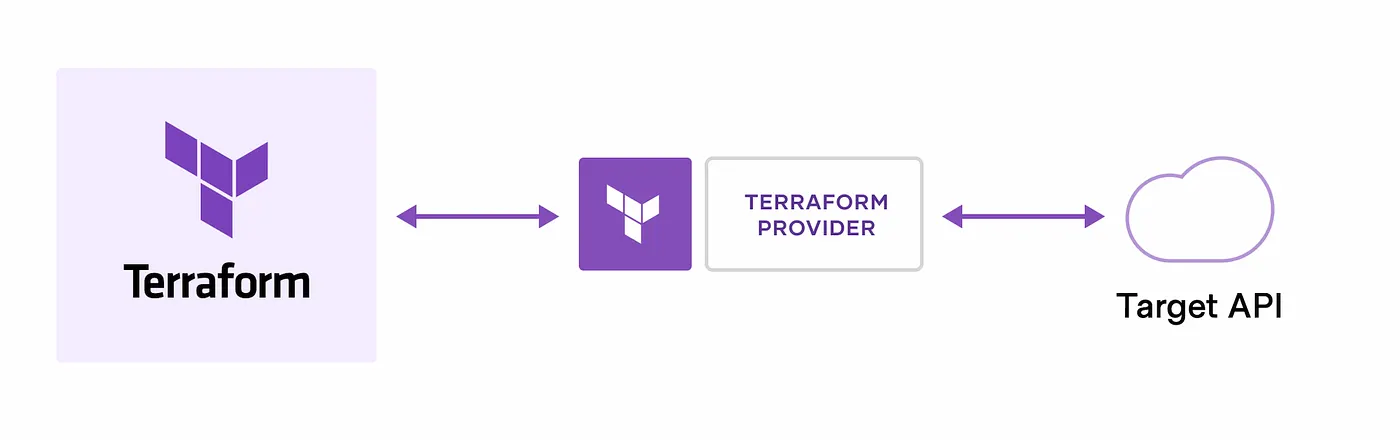
Because of this plugin-based architecture, Terraform is virtually limitless. The Terraform Registry hosts thousands of providers, allowing you to manage:
- Major Clouds: AWS, Azure, GCP.
- Orchestration: Kubernetes, Helm.
- Monitoring & Security: Datadog, Splunk, Vault.
- Version Control: GitHub, GitLab.
Resources are defined as individual units (like a single VM), which you can then bundle into Modules — reusable, LEGO-like blocks of configuration that standardise your workflow.
The Core Workflow: Write, Plan, Apply
Every “Late Night” session with Terraform follows the same rhythmic three-step process. This is the heartbeat of the tool:
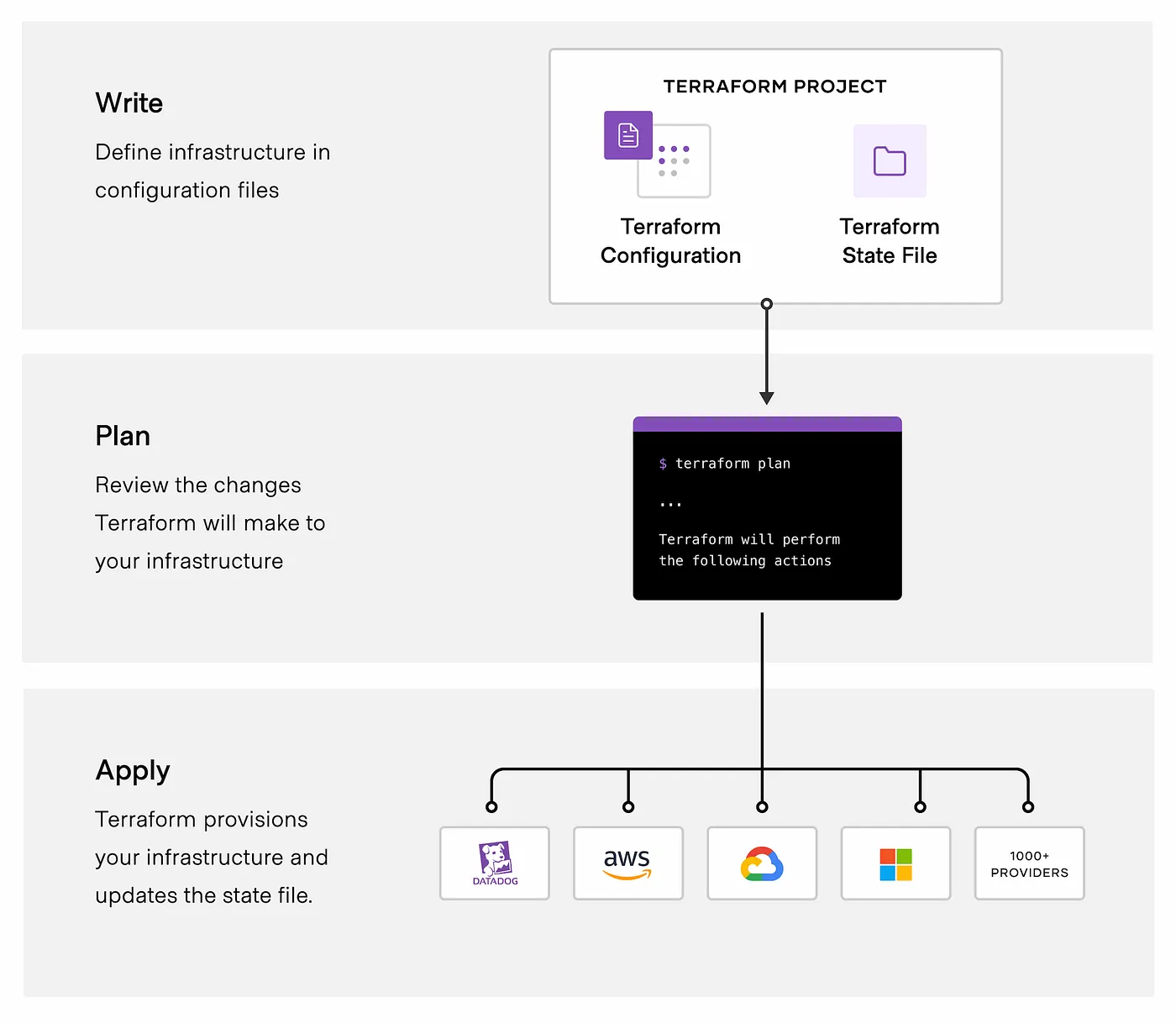
1. Write
This is where you define your desired state. You describe what you want (e.g., “I want a VPC with three subnets”) in HCL (HashiCorp Configuration Language).
2. Plan
Before making any changes, you run terraform plan. Terraform looks at your current real-world infrastructure, compares it to your code, and creates an execution plan. It tells you exactly what it will create, update, or destroy.
Think of this as your “Safety Net” — it ensures there are no midnight surprises.
3. Apply
Once you approve the plan, you run terraform apply. Terraform talks to the APIs and performs the operations in the correct order, automatically respecting dependencies (e.g., it knows it must create the Network before it can launch the Server).
The Agnostic Power: Why Terraform Wins in Multi-Cloud Environments
In the late-night quiet of a production push, you want a tool that is predictable. Terraform excels because it is built on four core pillars:
- Manage Any Infrastructure: From AWS to GitHub to Datadog, if it has an API, there is likely a provider for it in the Terraform Registry.
- Track Everything via State: Terraform keeps a “State File,” a digital map of your real-world resources. This acts as the Source of Truth, allowing Terraform to know exactly what needs to change to match your code.
- The Power of Declarative Code: You don’t write a step-by-step manual. You describe the end state you want (e.g., “I want 5 servers”), and Terraform handles the underlying logic and resource dependencies.
- Standardization & Collaboration: With Modules, you can package best practices into reusable blocks. By moving configuration files into Version Control (Git) and using HCP Terraform, teams can collaborate without stepping on each other’s toes.
Beyond the Server: Real-World Impact at Scale
How is Terraform actually used in the trenches? Here are the most common scenarios you’ll encounter as you move from “learning” to “architecting”:
1. Multi-Cloud & Hybrid Orchestration
Managing multiple clouds (AWS + Azure) adds massive complexity because each has its own API and portal. Terraform provides a single workflow to handle cross-cloud dependencies, simplifying orchestration for large-scale infrastructures.
2. Multi-Tier Application Deployment
For N-tier applications, you need web servers, database tiers, and routing meshes to work in harmony. Terraform allows you to manage these tiers together, automatically handling dependencies so your database is ready before your app tries to connect to it.
3. The “Self-Service” Model
In large organizations, central Ops teams are often bottlenecks. By using Terraform Modules, you can codify standards and allow product teams to “self-serve” their own clusters. This ensures they get what they need while remaining in compliance with company practices.
4. Policy Compliance and Management
Ticket-based reviews are slow. By using Sentinel (HashiCorp’s policy-as-code framework), you can automatically enforce governance policies. For example, you can block any deployment that doesn’t include mandatory security tags or uses expensive, unapproved instance types.
5. Disposable & Parallel Environments
Maintaining permanent Staging, QA, and Dev environments is expensive. Terraform lets you rapidly spin up parallel environments for testing and decommission them the moment you’re done. This “disposable infrastructure” approach is a massive cost-saver.
6. Software-Defined Networking (SDN) and Kubernetes
Terraform isn’t just for Virtual Machines. It can interact with SDNs to configure network ports automatically and manage Kubernetes clusters — from provisioning the cluster itself to deploying the pods and services running inside it.
7. PaaS Setup & Software Demos
Whether you’re setting up a Heroku app with Cloudflare CDN or creating a bootstrap demo for a potential client, Terraform allows you to provision and configure the entire stack consistently without ever touching a web interface.
A “Late Night” Pro-Tip:
If you’re just starting out, don’t try to Terraform your entire company on day one. Start with Use Case #7: Software Demos. Use Terraform to build a small, repeatable “sandbox.” Once your team sees how fast you can rebuild it from scratch, they’ll be hooked.
The Comparison: Choosing the Right Tool for the Job
One of the most common questions for any DevOps engineer (and a favorite on the Terraform Associate exam) is: “When do I use Terraform vs. Ansible or CloudFormation?”
Think of your infrastructure like a house:
- Terraform is the Architect and Builder: It levels the ground, pours the foundation, and builds the walls.
- Configuration Management (Ansible/Chef/Puppet) is the Interior Designer: It comes in once the walls are up to install the software, configure the wallpaper, and make sure the lights work.
Terraform vs. Configuration Management (Chef, Puppet, Ansible)
The biggest difference is Provisioning vs. Configuration.
- Configuration Management (CM) tools are designed to manage software on an existing machine.
- Terraform is a Provisioning Tool. It focuses on the high-level abstraction of the datacenter (VPCs, Subnets, IAM roles).
The Hybrid Approach: You don’t have to choose one! Many teams use Terraform to provision a server and then use cloud-init or a post-provisioner to trigger Ansible/Chef to configure the software inside that server.
Terraform vs. Cloud-Native (CloudFormation, Bicep)
Cloud-native tools like AWS CloudFormation or Azure Bicep are excellent, but they have one fatal flaw: Vendor Lock-in.
- Cloud-Native: Locked to one provider. If you move to multi-cloud, you have to learn an entirely new language.
- Terraform: Cloud-Agnostic. You use the same HCL syntax and the same “Plan/Apply” workflow for AWS, Azure, GCP, and even SaaS tools like Cloudflare or GitHub.
Terraform vs. Client Libraries (Boto3, Fog)
Developers often think, “I can just write a Python script using Boto3 to create my servers.” While true, there is a catch:
- Boto3 (Imperative): You have to write the logic for how to build. You must handle the errors, the timing, and the dependencies yourself.
- Terraform (Declarative): You describe what you want. Terraform handles the “how.” It builds a Resource Graph to determine the correct order of operations and manages the State so you don’t accidentally create duplicate resources.
🌙 Late-Night Reflection
The transition to code isn’t just a change in tooling; it’s a change in responsibility. When you stop clicking buttons and start committing files, you’re trading the comfort of manual safety for the power of repeatable intent. It’s a weightier way to work, but it’s the only way to build systems that outlast your own memory.
✅ Key Takeaways
- ClickOps defines infrastructure only at creation time, leaving no durable record of intent, decisions, or change history.`
- Infrastructure as Code (IaC) treats infrastructure as a declared, versioned system, managed the same way as application code.
- Manual infrastructure fails at scale due to drift, poor traceability, and reliance on human memory.
- Declarative models focus on desired state, allowing tools to determine how to reach it safely and predictably.
- Version control is central to IaC, enabling auditability, rollback, and collaboration.
- Terraform is a provisioning tool, designed to manage infrastructure resources — not configure software inside them.
- Terraform’s provider-based architecture enables cloud and platform agnosticism, making it suitable for multi-cloud and hybrid environments.
- Automation without intent is risk; IaC replaces guesswork with explicit, repeatable definitions.
📚 Further Reading
- Infrastructure as Code introduction video
- How Terraform helps you manage Infrastructure as Code
- Introduction to Infrastructure as Code with Terraform
- Infrastructure as Code in a private or public cloud blog post
- Terraform use cases documentation
🎬 What’s Next
The philosophy is set, but the mystery remains. It’s one thing to say we want to code our infrastructure; it’s another to understand the invisible machinery that actually executes it.
We’re taking the cover off to see the core and the plugins that do the real work.